BCPS Lighthouse Schools
  • Home
  • Schools
  • Reflections
  • Journeys
  • Learning
    • Learner-Centered Environments
    • Nights of Innovation
    • Summer Institutes
  • Press
  • #BCPSLH

Reflection of a Grade Changer

10/14/2016

0 Comments

 
Submitted by Karen Norton-Smith
​ First Grade Teacher, Church Lane Elementary School
Picture
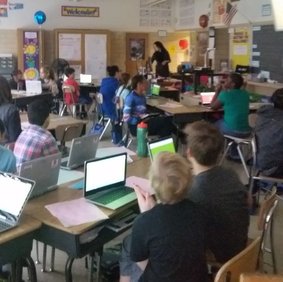
​I have taught kindergarten for 8 years at Church Lane Elementary Technology.  Our Lighthouse Status and one-to-one devices have opened doors to new and exciting resources.  During the 2015-2016 school year, our kindergartners received their devices.  My teaching team headed full-force into small group instruction to implement them into the classroom.  The students showed such amazing knowledge with computers and programs.  Many students were able to teach me new things and, therefore, teach their peers.  We call these geniuses, “Device Managers.”  This enabled me to focus more on interventions and small group instruction.  By the end of our school year, devices were being used in various ways across curriculum – with research, writing, publishing, learning activities, and, etc.
​
This school year, I moved to 1st grade; it has been a great transition due to several factors.  First, I know where the students are coming from, the knowledge they have gained and the curriculum instruction they have received; they have also had an entire school year of learning how to use our devices and programs.  This has made settling into our routines faster and easier.  With little-to-no reminders, students are getting into programs on BCPS One and on their desktops with ease.  Even our two new students are easing into use of devices and programs so much so that they are becoming Device Managers as well.  This is enabling me to assess students, instruct in small groups and intervene for students who are approaching grade level.  We have approached and tried new programs, like Classflow and Board Builder together.  As we use these new programs, we discuss our successes, the best ways to use them and how to solve problems together.  It seems as if our growth this year could be endless.
Picture
Picture
Picture
0 Comments

Leveraging Technology to Differentiate Learning

3/28/2016

0 Comments

 
Submitted by Stacie Elliott 
6th Grade ELA Teacherr, Dumbarton Middle School
Picture
My Lighthouse journey reached new heights when I combined flipped learning, formative assessment, and small group instruction to move students towards a summative assessment on identifying direct objects.  Yes, the lesson took time to plan, but once in the classroom, activities flowed seamlessly and students’ reflections noted how “awesome” and “helpful” they found the aforementioned methods in helping them meet the lesson’s objective.  The night prior to this lesson, students watched an Office Mix I created reviewing subjects, verbs, and prepositional phrases and introducing direct objects.  Students’ learning took place in the individual space, so students were ready to apply direct objects the next day.  When students entered the classroom the next day, they engaged in a Kahoot so I could formatively assess who was ready to move on and who still needed my help with direct objects.  Kahoot then made it quick and easy to group students; I downloaded the results and created groups in the time it took students to put away their devices.  As the period progressed, students’ who grasped the grammar concepts followed step-by-step instructions in small groups and applied the “ask three before me” procedure to complete their task in labeling sentences and then composing their own sentences that included direct objects.  While some students worked in small groups, I was able to target students who were struggling with identifying direct objects.  Eventually all students met at the end of the lesson and were summatively assessed on the same objective, but their methods of reaching that goal differed.  As one student stated, “I liked that the people who knew what they were doing weren’t bored waiting for the others to catch up!”   

0 Comments

Hour of Code 

2/26/2016

0 Comments

 
Submitted by Niamh McQuillan 
S.T.A.T. Teacher, 
Windsor Mill Middle
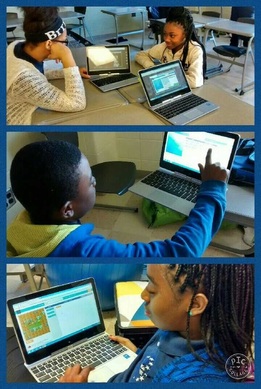
Is Windsor Mill the next Silicon Valley? In early December, students in Delenick’s 6th grade math classes forayed into the world of SDMs and KLOCs when they participated in the Hour of Code. The Hour of Code, a global movement, is an introduction to computer science designed to demystify code and show that anybody can learn the basics. Observed Delenick, “The students might have never known a profession like this exists if they hadn’t had have the chance to try it.” Delenick’s students created their own adventures in the Star Wars Galaxies, Minecraft, and the icy world of Frozen and navigated through the challenges with perseverance and critical thinking. Delenick noted, “Students were frustrated at first if they couldn’t get a program to work the correct way, but they kept trying and were ecstatic and hungry for more when they realized their controls were creating their game. It is a misconception that you have to be a strong math student to code; learning to code makes you a stronger math student. The students didn’t realize they were improving their skills.”
​
Picture
0 Comments

Using Technology to Support Small Group Instruction

2/26/2016

0 Comments

 
Submitted by Niamh McQuillan 
S.T.A.T. Teacher, 
Windsor Mill Middle
Picture
Picture
Ms. Hahn has eagerly embraced the use of small-group instruction and technology infusion in her 6th grade math classes at Windsor Mill Middle School. Hahn designed her furniture arrangement to house four stations in her classroom: Teacher Station—Hahn provides direct instruction with rigorous questioning to students; Activity Station—students take the skills learned with Hahn and apply them to an activity; Co-op Station—students may choose to work independently or with a partner or group on assignments housed in One Note; and Computer Station—students work on the Ascend Math program, an Intensive Math Intervention Program that begins work at each student's skill level. Hahn uses formative assessment to create groups that are responsive to student learning which affords her the opportunity to quickly and easily revisit the material with students who are struggling. She regularly revisits her classroom instructional model to tweak and fine tune the process and structure.
0 Comments

Kindergarten’s “Tech Tuesdays”

2/26/2016

0 Comments

 
Submitted by Katie Schmidt
5th Grade Teacher, 
Rodgers Forge Elementary
Picture
The downstairs hallway at Rodgers Forge Elementary has been buzzing with activity and excitement this year.  Kindergarten (yes…Kindergarten!!!) students in Mrs. Guth’s class (@tcguth) are now able to access Wixie, use text boxes to type their names and sentences, and use backgrounds, stickers, and paint tools in order to express their ideas.  Mrs. Guth often provides students with a word bank from which they can draw their ideas and learn new word spellings in addition to using their developmental spellings.  The students have been working with Wixie for several weeks now and proudly show off their work and explore other students’ ideas through a gallery walk.  Prior to learning how to use various Wixie tools during their “Tech Tuesday” time, Kindergarten students have also explored both the camera and video tools on their device, both the writing and drawing tools in activInspire, and have learned how to access both lesson tiles and digital content in BCPSOne  These skills are taught in a small group format over a one-hour block each week.  
0 Comments

Using Wixie to Produce Public Service Annoucenments

2/22/2016

0 Comments

 
Submitted by Carolyn Dickerson
6th Grade Teacher, Cockeysville Middle School
Picture
Picture
In the Latin America unit in 6th grade World Cultures, students analyze the issue of deforestation of the Amazon rain forest in order to explain the trade-offs of using resources to pursue economic opportunities versus preserving the environment.  For this indicator, students identify the characteristics of a tropical rain forest and identify the advantages and disadvantages of deforestation for people of Latin America.  The summative assessment for this topic is a public service produce a public service announcement on the trade-offs of deforestation.  The students used the Wixie for their public service announcement.  The criteria for the Wixie was the students needed to describe the importance of the Amazon Rain Forest, state their position on deforestation, and describe the world with or without the rainforest.  Once the students completed their public service announcement, they presented the public service announcement to their peers.
Picture
Picture
Student Examples:

 http://www.wixie.com/s3545022
Public Key: q53q9d
 
http://www.wixie.com/s3557349
Public Key: it5e8j
 
http://www.wixie.com/s3546089
Public Key: j278mg
Picture
0 Comments

Hour of Code

12/14/2015

 
Submitted by Lindsay O'Donnell
​Reading Specialist, Fort Garrison Elementary
Fort Garrison students, in Lindsay O’Donnell’s Library classes, are proud to have participated in the Hour of Code during Computer Science Education Week (Dec. 7-13). The Hour of Code is a national movement aimed at increasing the number of students involved in computer programming and to educate students about future careers in this field. 
Picture
Every Fort Garrison student in grades K-5 participated in the Hour of Code.  Kindergarteners started learning coding by turning the library carpet into a grid and giving each other directions to reach a destination.  Older students wrote lines of code to program their very own computer games featuring characters from Star Wars, Minecraft, and Flappy Bird, among others. Students used drag-and-drop blocks to link commands with events in their games. Some students were ready for a challenge and coded using JavaScript programming language. Many of our students agreed that computer programming seemed like a great career to have when they’re older!
Picture
Picture
For more information on the Hour of Code and to see other coding websites for kids, visit https://code.org/learn.

Tools to Create a 21st Century Learning Environment

12/19/2014

 
Submitted by Alison Lederer
1st Grade Teacher, Joppa View Elementary 

Being a first grade teacher in a lighthouse school has been a rollercoaster of excitement and opportunities. Being a first grade teacher in a lighthouse school AND a graduate student in an Educational Technology program has literally turned my teaching world upside down.

As I am studying the transformation of education in my graduate program at Loyola, I am constantly being introduced to SO many new tools and resources that are helping me create a 21st century learning environment. I feel so fortunate to be in a Lighthouse School where I actually have the devices required to reach this new level of learning. Not only do I get to learn about the newest tech tools and teaching methods…I get to practice them in my own classroom!
I have realized that picking an appropriate tech tool to use in a lesson takes TIME! Time to explore, sample and evaluate. Asking myself, “Will six-year-olds be able to use this?”, “Is this just using technology for the sake of using technology?”, “How can this tool make my lesson better or different?” and always the most important- “IS IT FREE??”

This process and experience is allowing me to weave through the vast amount of available tools and choose ones that are appropriate for my students and my lessons. As I find success with certain web tools, I am highlighting them on my website while I continue through my graduate program. I’d like to share my successes with other teachers and hopefully give them ideas on how to use these tools in their own classrooms. Please visit my site if you’re interested, and happy teaching!

Website URL: http://mslederer.weebly.com/ 

No Twitter? No Problem

11/25/2014

 
Submitted by Kelley McVicker
S.T.A.T. Teacher, Chase Elementary 

It all started with a text from my assistant principal.  She asked me if I knew any websites a fourth grade teacher and her students could visit in order to simulate a Twitter conversation.  Our fearless teacher, Ms. Smith, hit a roadblock when trying to set up Twitter accounts for her students.  The original plan was for students to participate in a Twitter conversation in order to summarize and discuss a chapter they were reading in ELA.  Unfortunately, an email address is required in order to create a Twitter account.  This posed a technological challenge much like some of the other unique challenges that we, as teachers in a Lighthouse School, experience on a daily basis.  At Chase, teachers have demonstrated great perseverance and determination as they work together to address these obstacles by developing creative solutions.    

As a member of this problem solving team, I logged onto my device and dove deep into the web to begin my search for a solution to our Twitter problem.  I was able to identify several websites that boasted mock Twitter simulations, but none that I thought significantly met the needs of the situation.  So, I sent an email to my trustworthy colleagues with whom I have had the pleasure to bond since Chase became a Lighthouse School.  The other Lighthouse School STAT teachers have become my “go to” resource when seeking immediate advice and effective resources.  Soon the emails, suggestions for websites, and actual lesson plans were flying back to me at optimum speed.  In less than a half hour, I had three solid ideas.  In a day’s time, I had an actual model lesson and links to examples!  We ended up creating a Twitter simulation using streaming mode in Padlet. 

Yes, piloting an ambitious initiative like the one represented in the Lighthouse Schools can pose daily challenges.  However, we have found that no challenge is insurmountable thanks to the growth mindset of our teachers and the amazing group of BCPS colleagues who work to solve problems in innovative ways.  Challenges are now viewed as opportunities for learning.  We realize that if we are not learning, then we are not growing, and neither are our students.  We are up to the challenge of making sure all of our students and teachers are learning and growing every day.

Technology Inspires Students at Fort Garrison

10/8/2014

 
Picture
Submitted by Ben Rozencwaig - 2nd Grade Student & 
Lea Mussini - Counselor, Fort Garrison Elementary

Last week in Stacy Crain's 2nd grade class at Fort Garrison Elementary students learned how to use the QR reader on their devices during a writing activity. One student, Ben Rozencwaig, was so inspired he went home and made his own QR code.  The next day students were able to scan it in class and read about the Orioles. 

Here is Ben's reflection on his experience: 

None of us had our very own computer before. We were learning about it, and Mrs. Crain showed us her QR Code. I thought this was really cool. So I went home, and I thought about what I could do for a QR code. I’ve been thinking a lot about the Orioles and the playoffs so I thought that I could do a QR code about the Orioles because I am so proud of them for making the playoffs. It was very exciting for me because we haven’t won the World Series in a really long time. It was a good way for me to express my feelings about being proud of the Orioles! The QR code is really cool and interesting to me. You can scan it and find out a lot of things about other people and things!  


Forward>>

    Authors

    Reflections from teachers, administrators, and students at the Lighthouse Schools.

    Categories

    All
    Administrator
    Art
    Community Engagement
    Counselor
    Digital Citizenship
    Digital Tools
    Flipped Learning
    Language Arts
    Learner Centered Environment
    Maker Learning
    Math
    Music
    Personalized Learning
    Physical Education
    Professional Development
    Project Based Learning
    Real World Connections
    Research Skills
    Science
    Small Group Instruction
    Social Studies
    Student
    Teacher
    Technology

    RSS Feed

    Archives

    June 2018
    May 2018
    April 2018
    March 2018
    February 2018
    January 2018
    December 2017
    November 2017
    October 2017
    July 2017
    June 2017
    May 2017
    April 2017
    March 2017
    February 2017
    January 2017
    December 2016
    November 2016
    October 2016
    August 2016
    June 2016
    May 2016
    April 2016
    March 2016
    February 2016
    January 2016
    December 2015
    November 2015
    October 2015
    June 2015
    May 2015
    April 2015
    March 2015
    February 2015
    January 2015
    December 2014
    November 2014
    October 2014
    September 2014
    August 2014
    July 2014
    June 2014

Team BCPS Logo

© 2015 Baltimore County Public Schools. All rights reserved. 

Proudly powered by Weebly