BCPS Lighthouse Schools
  • Home
  • Schools
  • Reflections
  • Journeys
  • Learning
    • Learner-Centered Environments
    • Nights of Innovation
    • Summer Institutes
  • Press
  • #BCPSLH

Reflection of a First Year Teacher in a Lighthouse School

11/8/2016

1 Comment

 
Submitted by  Lindsay Montanye
5th Grade Teacher, Fort Garrison Elementary School

​As a first year teacher, working in a county that has been so technologically advanced has truly been a blessing. I just recently graduated from Salisbury University, and I was actually required to take a class about how to use technology in the classroom. I also took many classes through Salisbury’s Education Program that enabled me and showed me how to make the most of the technology in my classroom. Going from the college experience to actually being a classroom teacher means that I get to apply everything I learned in college to my classroom, teaching, and students.

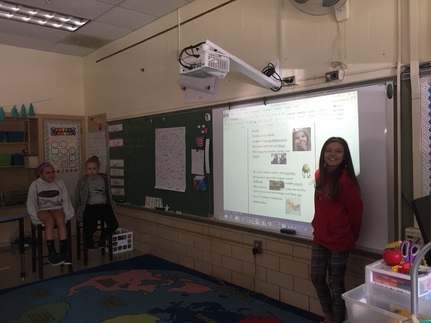
I am very happy and thrilled to be teaching 5th grade at Fort Garrison Elementary School, a Lighthouse School. Working in a Lighthouse School gives me endless opportunities and possibilities in the sense of how I teach the material given to me in Baltimore County’s curriculum.  Each one of my students has had and used their own device on a daily basis for three years now. This means they are well versed in how to use their device properly and effectively. My students are so great at using their devices that they even run to my side if I am ever having trouble working my technology. Also, in the case that we have a student who is new to our Lighthouse School and new to devices in general my students are so remarkable at teaching the new student how to work a device that it brings me a sense of peace.

My 5th grade students use their devices in a countless number of ways daily. For example, they go on Dreambox to practice their math skills, they use Discovery Education and BrainPop for research projects, and more. Since I teach 5th grade, my students are very independent learners and love to have opportunities to explore their own learning. I make the most of this independence by assigning them lesson tiles with links, files, directions, and more that students will need throughout a lesson. I also make a chart each day with each reading group’s rotations and post it to a lesson tile so students can work at their own pace and be informed as to what they have to get done for the day. Another efficient way that I use my device is by creating turn-ins on BCPS One. Students turn in their work to the turn-in in the form of Microsoft Word documents or PowerPoints to decrease the amount of paper we use.

Overall, being a first year teacher in a Lighthouse School has been an amazing opportunity and I can’t wait to continue to use technology on a daily basis in my classroom! I am happy that I’m able to use the knowledge and skills I gained in my college career in my classroom. I also feel that being a teacher in a Lighthouse School has supplied me with endless opportunities to engage and captivate my students in our everyday lessons. I am especially thankful that our county is so focused on preparing its students for life in a digital age. 
Picture
1 Comment

MakerSpace at Rodgers Forge Elementary

10/7/2016

0 Comments

 
Submitted by Katie Schmidt
5th Grade Teacher, Rodgers Forge Elementary
Picture
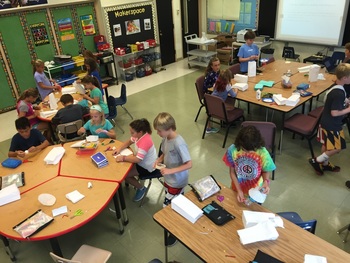
Rodgers Forge Elementary unveiled its new “MakerSpace” at the start of the 2016-2017 school year.  Students and teachers alike were incredibly excited to get in and make use of the new location in which students are encouraged to explore, problem-solve, collaborate, create, engineer and more…all while making real world connections!
 
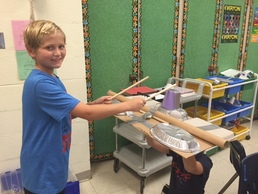
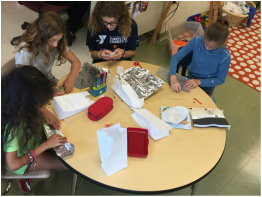
The room is filled with a variety of materials for students to use as they explore concepts and/or create projects.  Some examples include cardboard, foil, clay, rubber bands, littleBits®, soda bottles, milk jugs, old CDs, small craft supplies, pipe cleaners, and coffee filters just to name a few.  Many of the items used in the MakerSpace are reusable, which ties in with our Green School initiative as well. 
 
“I really like the MakerSpace because it gives you a chance to use your creativity,” explains fifth grader Amelia Bolin.  “If you have an idea during class, you don’t have to just think about it anymore, you can actually go to the MakerSpace to build it!” 

 
Megan Patton, resource teacher at Rodgers Forge Elementary, has been doing introductory sessions in the MakerSpace for various classes.  "We have been having so much fun getting to know our new Makerspace,” Patton shares.  “We read The Most Magnificent Thing and students were given mystery bags filled with random items that they used to create something new. As we move forward, we will be building and testing what we have built. Stay tuned for some fun fall activities in the Makerspace."
Picture
Picture
0 Comments

Interactive Bulletin Boards Personalize Student Learning

6/17/2016

0 Comments

 
Submitted by Niamh McQuillan 
S.T.A.T. Teacher, 
Windsor Mill Middle
Picture
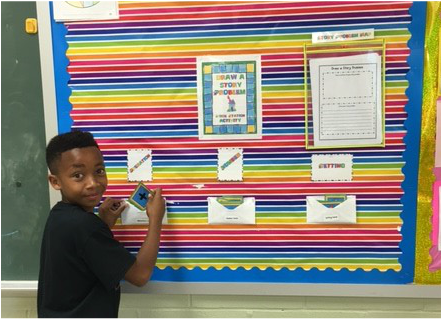
A cornerstone of Ms. Delenick’s teaching practice in 6th grade math at Windsor Mill Middle School is creating an environment where learning is personalized and responsive. Eager to re-invent her room from top to bottom as a place of inquiry, Ms. Delenick designed an Interactive Bulletin Board where students could create word problems for other students to solve. The activity is called “Draw a Story Problem.” Students select an operation, a set of numbers, and a setting from the pockets on the board, and create a word problem on a template. The student-generated word problem is then posted on the bulletin board for other students to solve. Ms. Delenick said of the activity, “Students have choice. One boy took the setting he selected—football—very seriously and researched the Carolina Panthers, so he could have an authentic reproduction of their logo in his problem.”  Both the problems and the solutions give rise to vigorous debate and rivalries to create the toughest and most creative problems.    
0 Comments

Using a World Cafe to Foster Professional Learning

4/20/2016

0 Comments

 
Submitted by Niamh McQuillan 
S.T.A.T. Teacher, 
Windsor Mill Middle
Picture
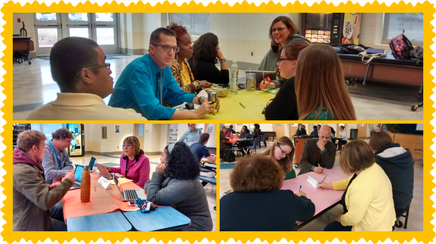
Mindful that the digital conversion moves to the 7th grade next year, 6th grade teachers at Windsor Mill Middle School shared their year-long experience and insight via a World Café during a faculty professional development. Teams gathered at color-coded tables hosted by the 6th grade veterans. Teachers brainstormed responses to questions via a communal ‘table cloth.’ The prompts asked teachers to consider the major shifts they anticipated for a 1-1 Learner-Centered Environment with regard to device management, room set-up, behavior management and establishing classroom expectations.  Teachers also pondered how technology can be used to enhance instruction and not lead instruction. Teams talked and talked, then talked some more, and came away wiser, with tools and understandings to continue the work.  
0 Comments

Students Use Buckets to Personalize Learning Space

4/20/2016

0 Comments

 
Submitted by Niamh McQuillan 
S.T.A.T. Teacher, 
Windsor Mill Middle
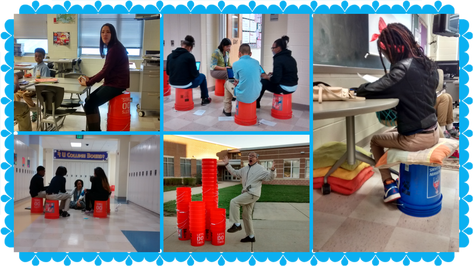
Following a Lighthouse Middle School day of learning at Sparrow’s Point, STAT Teacher Niamh McQuillan rushed back to teachers at Windsor Mill Middle School to share a simple and ingenious tool for responsive teaching: the Painter’s Bucket. Three weeks later, thanks to local hardware and paint stores, over 90 buckets found their way into the nooks and crannies of Windsor Mill classrooms and hallways. Students took to the new furniture option on day one, plopping colorful cushions on overturned buckets to personalize their learning space and process. 
Picture
0 Comments

Fluid Movement

4/8/2016

0 Comments

 
Submitted by Teresa McGuire
Social Studies Teacher, 
Windsor Mill Middle
Picture
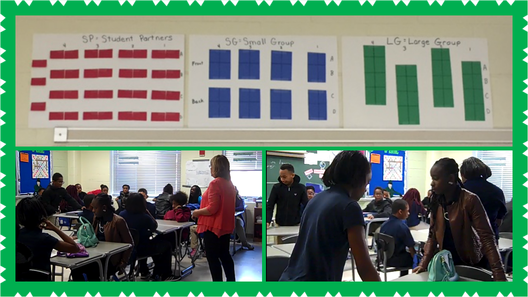
Teaching social studies is an ever-changing adventure and requires a classroom that is flexible.  At the beginning of the year I was struggling with making the room cohesive with responsive lessons.   There were many times when students needed to work together in small or large groups.  Other times required more direct instruction.  The solution for me was to create a more fluid room arrangement.  In this type of classroom, the students create the type of arrangements that fit the lesson.  Sometimes the students work independently or with a partner.  Other times they need to work in small, or even large groups of 6-8.  By making a few quick and easy transitions, the desks can be moved and partners can now join up with other to create groups.  In this, lessons can flow from group instruction, to research with a partner for reinforcement to group projects and then back again to accommodate the next class.  
0 Comments

Joppa View Teachers Reflect On Classroom Changes

11/11/2014

 
Submitted by Kerry Flanigan
Assistant Principal, Joppa View Elementary

Teachers at Joppa View Elementary have transformed their classrooms into learner-centered environments. Several teachers took a moment to reflect on how these changes have affected their teaching style and students' learning. 
Maryann Nietubicz
Emily Pfeifer
Kellie Price
Heidi Womack

Creating Student-Centered Learning Environments

10/21/2014

 
Submitted by Katie Cox
S.T.A.T. Teacher, Mays Chapel Elementary 

Back on September 11, this blog showcased some early teacher reflections on learner-centered environments from Mays Chapel Elementary. That brief video has been updated with more insights from teachers, clips of students working in their flexible spaces, and student voices. Check it out:

Early Reflections on Learner-Centered Environments

9/11/2014

3 Comments

 
Submitted by: Katie Cox - S.T.A.T Teacher, Mays Chapel Elementary,
Katie Schmidt - 5th Grade Teacher, Rodgers Forge Elementary & 
David Robb - Supervisor, Dept. of Innovative Learning

After reflecting on training about learner-centered environments from the Lighthouse Summer Institute, many teachers are being very thoughtful about how to set up their classrooms this year. 

This first video reflection featuring Bethany Banks and Shantell Breen at Mays Chapel was taken during the week before students arrived as teachers were setting up their classrooms. 
The second video reflection from Rodgers Forge 5th grade teacher Katie Schmidt was recorded after just two weeks with students. As you'll hear, making the classroom more student-centered takes some adjustment, but Katie is already noticing more student engagement.
3 Comments

Hawthorne's Learning Environments

8/26/2014

1 Comment

 
Submitted by Yvonne Barhight
Principal, Hawthorne Elementary 

Hawthorne Elementary teachers have been hard at work setting up learner-centered environments. Check out the creative spaces teachers have been preparing for opening day . . .
1 Comment
Forward>>

    Authors

    Reflections from teachers, administrators, and students at the Lighthouse Schools.

    Categories

    All
    Administrator
    Art
    Community Engagement
    Counselor
    Digital Citizenship
    Digital Tools
    Flipped Learning
    Language Arts
    Learner Centered Environment
    Maker Learning
    Math
    Music
    Personalized Learning
    Physical Education
    Professional Development
    Project Based Learning
    Real World Connections
    Research Skills
    Science
    Small Group Instruction
    Social Studies
    Student
    Teacher
    Technology

    RSS Feed

    Archives

    June 2018
    May 2018
    April 2018
    March 2018
    February 2018
    January 2018
    December 2017
    November 2017
    October 2017
    July 2017
    June 2017
    May 2017
    April 2017
    March 2017
    February 2017
    January 2017
    December 2016
    November 2016
    October 2016
    August 2016
    June 2016
    May 2016
    April 2016
    March 2016
    February 2016
    January 2016
    December 2015
    November 2015
    October 2015
    June 2015
    May 2015
    April 2015
    March 2015
    February 2015
    January 2015
    December 2014
    November 2014
    October 2014
    September 2014
    August 2014
    July 2014
    June 2014

Team BCPS Logo

© 2015 Baltimore County Public Schools. All rights reserved. 

Proudly powered by Weebly