
|
|
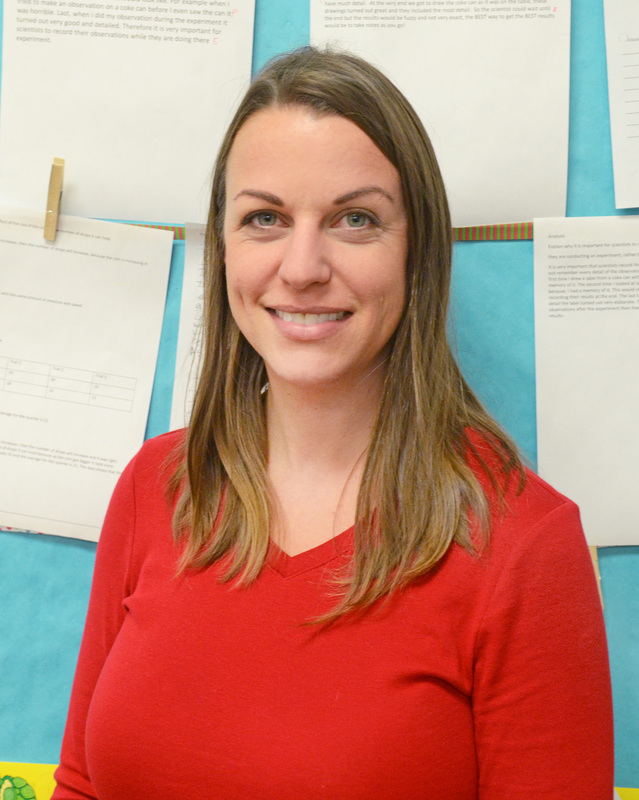
Maureen Trentzsch - 6th Grade Teacher, Cockeysville Middle
|
Maureen Trentzsch has been teaching middle school science for 13 years. She graduated from Salisbury University and earned her Master’s in Elementary Education with a concentration in middle school science at Towson University. She currently teaches 6th grade and coaches the badminton and Quiz Bowl teams. In her free time she enjoys spending time with her family and enjoying the outdoors.
|
June 2016
As we come to an end, I don’t even know where to begin. I’ve loved my experience with the devices this year. I have learned a lot regarding classroom management, and effective use of technology in instruction simply through the active use of the devices and trial and error. Although I started out with tremendously high hopes and expectations that were quickly thwarted in the beginning of the year, by the end of this year those expectations were actually met! My students are now able to use their devices for research, projects, creative assignments, and even Turn-Ins. Would you believe that ALL of my students effectively turned in their last Turn-In? It has been a long road, but we’ve finally made it with a lot of patience and hard work. I can’t wait until next year use all the new strategies I’ve learned!
As we come to an end, I don’t even know where to begin. I’ve loved my experience with the devices this year. I have learned a lot regarding classroom management, and effective use of technology in instruction simply through the active use of the devices and trial and error. Although I started out with tremendously high hopes and expectations that were quickly thwarted in the beginning of the year, by the end of this year those expectations were actually met! My students are now able to use their devices for research, projects, creative assignments, and even Turn-Ins. Would you believe that ALL of my students effectively turned in their last Turn-In? It has been a long road, but we’ve finally made it with a lot of patience and hard work. I can’t wait until next year use all the new strategies I’ve learned!
April 2016
Boy, has my journey with the devices been moving forward as I have started teaching the new 6th grade science curriculum! The new curriculum is great in that it provides a variety of resources for the students to use to learn about the content, so the devices have been a huge asset in the classroom! I am able to offer an assortment of choices for my students to access information, ranging from hands on activities, to videos, to interactive simulations, to online texts. It is great to see every student engaged in learning because they can select a method for learning that they prefer. I’ve moved forward in my digital journey to using Wikis on BCPS One with links to the different resources. This way, I can put all of the directions for the lesson and all of the resources on one page, and then put that page up as one lesson tile. This makes assigning the Lesson Tiles so easy since there is only one tile with everything on it! To top it off, I can make changes to the Wiki and it automatically makes changes on the tiles that are already posted. Plus, the Wiki will already be in BCPS One next year when I need to assign it again! I have also become much more comfortable with having the students use the “Turn-In’s” feature in BCPS One to submit their work. It is so convenient that I am notified when someone has submitted an assignment, and it even gives the date and time it was submitted. I was weary of it at first, but I have learned to love the “Turn-In’s” feature since it makes grading and leaving feedback so much quicker for me. I love that I can type my comments instead of hand-write them, and that when I enter the grade it goes straight into the gradebook. Of course, I still have a few students who have not mastered the “Turn-In,” but we are working on it! I’m excited for my students and myself to continue using the technology and continue to become more comfortable with it!
Boy, has my journey with the devices been moving forward as I have started teaching the new 6th grade science curriculum! The new curriculum is great in that it provides a variety of resources for the students to use to learn about the content, so the devices have been a huge asset in the classroom! I am able to offer an assortment of choices for my students to access information, ranging from hands on activities, to videos, to interactive simulations, to online texts. It is great to see every student engaged in learning because they can select a method for learning that they prefer. I’ve moved forward in my digital journey to using Wikis on BCPS One with links to the different resources. This way, I can put all of the directions for the lesson and all of the resources on one page, and then put that page up as one lesson tile. This makes assigning the Lesson Tiles so easy since there is only one tile with everything on it! To top it off, I can make changes to the Wiki and it automatically makes changes on the tiles that are already posted. Plus, the Wiki will already be in BCPS One next year when I need to assign it again! I have also become much more comfortable with having the students use the “Turn-In’s” feature in BCPS One to submit their work. It is so convenient that I am notified when someone has submitted an assignment, and it even gives the date and time it was submitted. I was weary of it at first, but I have learned to love the “Turn-In’s” feature since it makes grading and leaving feedback so much quicker for me. I love that I can type my comments instead of hand-write them, and that when I enter the grade it goes straight into the gradebook. Of course, I still have a few students who have not mastered the “Turn-In,” but we are working on it! I’m excited for my students and myself to continue using the technology and continue to become more comfortable with it!
January 2016
I cannot believe the year is halfway over! Not much has changed for me, technology wise, since December. I have continued to use the device as a tool to enhance my students’ learning. They have really enjoyed different activities to enhance the curriculum like Gizmos, the PHET interactive simulations, Kahoot, Wixie, Board Builder, and the Discovery Ed. Tech Book. I was fortunate enough to attend a training on the Tech Book, so one of my goals was to use it more. I love that I can put several links to Discovery Ed. content all in the same place through assignment builder. This allows me to present content in different ways, such as video clips, reading passages, animations, interactive simulations, and glossary terms. My students can then choose the way they want to view the content, and they can work at their own pace. My students have expressed their enjoyment of these various activities. I also have discovered that I can assign assessments from sections of the tech book to my students, and Discovery Ed. will grade it and I can just look up the score! I just wish Discovery Ed. was a bit more user friendly. It can be hard to find the place where the scores are reported. Also, when grading boards from Board Builder, the students are not grouped by class, so it can be pretty confusing. There are a lot of neat things you can do with Discovery Ed. though, and I hope to discover more!
I cannot believe the year is halfway over! Not much has changed for me, technology wise, since December. I have continued to use the device as a tool to enhance my students’ learning. They have really enjoyed different activities to enhance the curriculum like Gizmos, the PHET interactive simulations, Kahoot, Wixie, Board Builder, and the Discovery Ed. Tech Book. I was fortunate enough to attend a training on the Tech Book, so one of my goals was to use it more. I love that I can put several links to Discovery Ed. content all in the same place through assignment builder. This allows me to present content in different ways, such as video clips, reading passages, animations, interactive simulations, and glossary terms. My students can then choose the way they want to view the content, and they can work at their own pace. My students have expressed their enjoyment of these various activities. I also have discovered that I can assign assessments from sections of the tech book to my students, and Discovery Ed. will grade it and I can just look up the score! I just wish Discovery Ed. was a bit more user friendly. It can be hard to find the place where the scores are reported. Also, when grading boards from Board Builder, the students are not grouped by class, so it can be pretty confusing. There are a lot of neat things you can do with Discovery Ed. though, and I hope to discover more!
December 2015
So it has been about a month, and wow, how my worries have subsided! I had been stressing over having my students master the “turn in” feature on BCPS One, and it turns out (see what I did there!) that it ended up not being as big of a deal as I thought. See, I have started using the “turn in” feature as part of my student choice options. The students who would rather type their answer than write it have the option to do so, and upload it into “turn ins” for me to grade. And wouldn’t you know, most students are choosing to write their answers!
At this point in the year, I am focused on using the lesson tiles in BCPS One to push assignments and quizzes out to my students. It allows me to send anything digital to my students’ accounts so they can access it with just a click! This includes any file on my computer, PowerPoints, websites, videos, brain pop, etc. I can also choose which students receive which assignments and quizzes, so I can push modified things to certain students. This has given me to opportunity to differentiate based on student needs. It allows me to make sure that students are learning on their level and to provide extension and remediation activities when necessary.
The best part is that every one of my students has a device every day, which opens up so many possibilities for us in the classroom. There are so many activities we can do, and so many resources they can access, right at their fingertips. Literally! I don’t have to worry about signing up for a computer lab, or making sure we stay on track, schedule wise, until we get to the computer lab. It has made my teaching much more flexible, and I am able to adjust my lessons as needed without worrying about a schedule. If we need to slow down and review, we can just push any lesson, technology or not, to the next day if we need to stop and review. I love the opportunities and flexibility the devices have given us!
So it has been about a month, and wow, how my worries have subsided! I had been stressing over having my students master the “turn in” feature on BCPS One, and it turns out (see what I did there!) that it ended up not being as big of a deal as I thought. See, I have started using the “turn in” feature as part of my student choice options. The students who would rather type their answer than write it have the option to do so, and upload it into “turn ins” for me to grade. And wouldn’t you know, most students are choosing to write their answers!
At this point in the year, I am focused on using the lesson tiles in BCPS One to push assignments and quizzes out to my students. It allows me to send anything digital to my students’ accounts so they can access it with just a click! This includes any file on my computer, PowerPoints, websites, videos, brain pop, etc. I can also choose which students receive which assignments and quizzes, so I can push modified things to certain students. This has given me to opportunity to differentiate based on student needs. It allows me to make sure that students are learning on their level and to provide extension and remediation activities when necessary.
The best part is that every one of my students has a device every day, which opens up so many possibilities for us in the classroom. There are so many activities we can do, and so many resources they can access, right at their fingertips. Literally! I don’t have to worry about signing up for a computer lab, or making sure we stay on track, schedule wise, until we get to the computer lab. It has made my teaching much more flexible, and I am able to adjust my lessons as needed without worrying about a schedule. If we need to slow down and review, we can just push any lesson, technology or not, to the next day if we need to stop and review. I love the opportunities and flexibility the devices have given us!
October 2015
My journey with the devices began with eagerness, excitement, and grandiose ideas of research and projects. I was thrilled that each one of my middle school science students would have a device in their hands every day! With my expectations so high, my reality may have been jaded. I just knew that everything would be wonderful! You need to know though, that I am a pre-planner, meticulous with the details, and always reaching for perfection. So in June of 2015, I typed up a document titled “Device procedures to teach” so I would be ready to get my sixth graders acclimated to the device and on a roll. I was sure it would be a breeze and they would be pros in no time!
I wasn’t ready for the time it took to teach them how to do even the simplest tasks. Kids these days are so tech saavy, right? Turns out, they know their way around technology, but not in the way needed for school! First, we spent a whole period on creating a science folder with several folders inside of it to organize and store their files in. This took us THE. WHOLE. PERIOD. 45 minutes. This, in itself, isn’t the end of the world. But when you’re expectations are much higher than that, and you expect to create the folders so quickly that you have time to actually complete an assignment, then things can get pretty frustrating. Some other things that unexpectedly took a whole period each, include downloading and saving a file from our online learning system BCPS One, and completing an assignment and uploading it to turn-ins in BCPS One. To top it off, only about half of the students actually uploaded the assignment correctly, when we finally got to that step.
So my advice for those first few weeks is to be prepared to take it slow. Find your patience, grab it, and don’t let go. And create something, some file, that is not an important, graded assignment, to use when teaching them how to download, save, and upload. That will take the stress off of both you and your students because it won’t affect their grade when they don’t get it uploaded right the first time, and you won’t be spending a whole week chasing students down and grading the same assignment. Because there’s nothing worse for establishing beginning of the year relationships with your students than a frustrated, stressed out teacher who can’t get their students to get their work turned in, even though they’ve spent a week doing it and trying!
I still have my eagerness and excitement, but I’m living in reality, with more patience and a slower pace, for now. I now have grandiose ideas of my students mastering the file save, and turn-ins upload. In, maybe a month. I know it will get better, in due time!
My journey with the devices began with eagerness, excitement, and grandiose ideas of research and projects. I was thrilled that each one of my middle school science students would have a device in their hands every day! With my expectations so high, my reality may have been jaded. I just knew that everything would be wonderful! You need to know though, that I am a pre-planner, meticulous with the details, and always reaching for perfection. So in June of 2015, I typed up a document titled “Device procedures to teach” so I would be ready to get my sixth graders acclimated to the device and on a roll. I was sure it would be a breeze and they would be pros in no time!
I wasn’t ready for the time it took to teach them how to do even the simplest tasks. Kids these days are so tech saavy, right? Turns out, they know their way around technology, but not in the way needed for school! First, we spent a whole period on creating a science folder with several folders inside of it to organize and store their files in. This took us THE. WHOLE. PERIOD. 45 minutes. This, in itself, isn’t the end of the world. But when you’re expectations are much higher than that, and you expect to create the folders so quickly that you have time to actually complete an assignment, then things can get pretty frustrating. Some other things that unexpectedly took a whole period each, include downloading and saving a file from our online learning system BCPS One, and completing an assignment and uploading it to turn-ins in BCPS One. To top it off, only about half of the students actually uploaded the assignment correctly, when we finally got to that step.
So my advice for those first few weeks is to be prepared to take it slow. Find your patience, grab it, and don’t let go. And create something, some file, that is not an important, graded assignment, to use when teaching them how to download, save, and upload. That will take the stress off of both you and your students because it won’t affect their grade when they don’t get it uploaded right the first time, and you won’t be spending a whole week chasing students down and grading the same assignment. Because there’s nothing worse for establishing beginning of the year relationships with your students than a frustrated, stressed out teacher who can’t get their students to get their work turned in, even though they’ve spent a week doing it and trying!
I still have my eagerness and excitement, but I’m living in reality, with more patience and a slower pace, for now. I now have grandiose ideas of my students mastering the file save, and turn-ins upload. In, maybe a month. I know it will get better, in due time!

© 2015 Baltimore County Public Schools. All rights reserved.